YouTube TV: Live TV & more
- 3.8
- Rating
- 10.00M
- Installs
- Free
- Price

 Analysis by App-foxy
I approached YouTube TV: Live TV & more as something a household might actually use, rather than as a simple replacement for a cable box. In practice, its appeal is easy to understand: one app for live television, news, sports, and shows, available on a phone or a larger screen when you want a more traditional viewing experience. It is a free entertainment app to install, developed by Google LLC, while the service itself includes paid access and optional in-app purchases ranging from a few cents to very high amounts depending on the item.
My overall impression is positive, but it depends heavily on how you watch television. If you want live programming and prefer browsing channels instead of choosing every program from a streaming library, this is a much more natural fit than an on-demand-only service. If you mostly watch a small collection of shows whenever you like, the live-TV approach may feel unnecessarily expensive or restrictive. The important question is not whether the app can show television; it is whether live scheduling makes sense for your home.
How YouTube TV works in a shared household
The most convincing everyday scenario is a shared screen in a busy home. One person may want a news broadcast in the morning, another may be waiting for a sports event, and someone else may simply want a familiar show in the evening. A live-TV app can reduce the need to switch between several separate broadcaster apps, especially when the household does not want to remember which service carries which channel.
You May Also Like

 Blood Strike: 2.5 Anniversary
Blood Strike’s Loadouts Turn Every Drop Into a Tactical Gamble
A close look at Blood Strike’s custom loadouts: how fast access to signature weapons reshapes its battle royale rhythm, rewards preparation, and narrows the gap between fights.

 Pandora - Music & Podcasts
Pandora’s Music Is Easy to Start, but Harder to Recover
Pandora’s strength is its low-effort path from a seed to a station. Its weak spot is how much confidence it asks you to place in connection, setup, and quiet recovery.

 8 Ball Pool
 Is Built on Rivalries, Rematches, and Routine
A close look at the rivalries, rematches, shared routines, and unanswered safety questions that turn a quick pool match into a persistent mobile community.

 Samsung Music
’s Quiet Strength Is Playing What You Already Own
Its reach comes less from spectacle than from dependable access to a personal library. That simplicity is both the app’s strongest retention engine and its ceiling.

 AccuWeather: Weather Radar
AccuWeather Review: A Quick, Clear Forecast for Everyday Decisions
For everyday plans, the best forecast is the one you can understand quickly. AccuWeather makes rain timing, radar, and local conditions easy to act on, with a few trade-offs.

 Hill Climb Racing
Why Hill Climb Racing Still Turns Crashes Into One More Run
A tiny car, a bumpy hill and one more upgrade: Hill Climb Racing keeps resurfacing because its simple chaos makes every near-miss feel personal.
More From Our News Desk



I also found the format more useful for spontaneous viewing than many on-demand alternatives. Instead of spending ten minutes searching through menus, I can open the live guide and see what is happening now or soon. That small difference matters when I am cooking, taking a quick break, or joining something that has already started. The trade-off is that the schedule controls the moment. If I miss a program or want to watch at a completely different time, a conventional on-demand catalog may be more convenient.
For a shared device, I would treat the app as a household viewing tool rather than assume that every person will have an identical experience. The main screen is easy to understand, but preferences, viewing habits, and account access still need to be coordinated by the people using the device. I would decide in advance who normally signs in, which screen is used most often, and whether the app is intended for casual viewing or as the home's primary television service.
That conversation is more useful than simply installing it and expecting the app to solve household disagreements. Live television gives everyone access to the same broad schedule, but it does not remove the need to agree on what the shared screen should show. In my experience, the app works best when one person is not constantly changing settings or signing out while someone else is watching.
Where the live guide earns its place
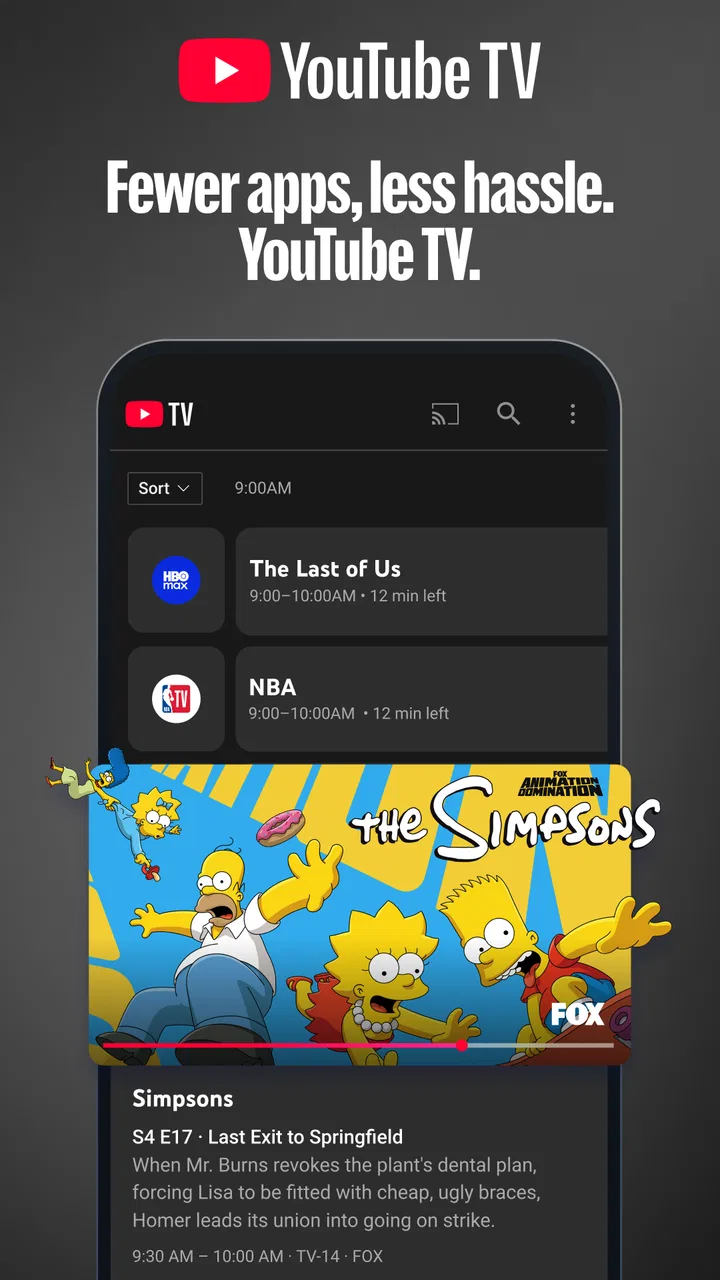
The guide is the feature I would use most often. It changes the experience from searching for individual programs to scanning a television schedule, which feels familiar to anyone who has used traditional TV. This is particularly helpful for news and sports, where the value is often tied to watching at the right time rather than waiting for a later upload.
A practical habit is to check the guide before opening several other entertainment apps. If I know I want something live, starting here can be faster than checking a news app, a sports app, and a broadcaster's service separately. It is also useful when I do not have a specific title in mind and simply want to see what is available.
There is a downside to that same convenience. A large channel lineup can create choice fatigue, and the guide may feel busy when I only want one particular program. Viewers who dislike scheduled television should not expect the live interface to behave like a clean, focused movie library. This is a service built around channels and programming flow, not just individual titles.
Setting it up without creating account confusion
Because the app is from Google LLC, many users will already be familiar with the general account environment, but I would still separate installation from service access in my planning. Downloading a free app does not mean that every live channel is automatically available without a subscription. That distinction is easy to overlook when someone in the household installs it quickly and assumes the first screen represents the complete viewing experience.
Before using it on a shared television, I would make sure the household knows which account is being used and who is responsible for any purchase decisions. This matters because the app supports in-app purchases, with individual items priced from $0.05 to $999.99. I would not hand a shared device to a child or guest without first checking the account context and the purchase flow on that device.
I would also avoid repeatedly moving between accounts just to test the app. That can make it harder to tell whether a problem comes from the device, the account, or the service plan. A cleaner setup is to choose the main household account, sign in once, and let the regular viewer use the same television environment unless there is a clear reason to change it.
On a phone, the setup is more personal because the device usually belongs to one person. On a living-room screen, the consequences are different: a sign-out affects everyone, and a change made by one user may surprise another. That is why I see account boundaries as part of the setup, not as an afterthought.
Coordinating viewing across people and screens
Shared use becomes easier when the household agrees on a few simple rules. I would choose one primary screen for live viewing, keep a second device available for checking the guide, and avoid treating the phone as a guaranteed substitute for the television in every situation. The phone is excellent for quick browsing, but a larger display is more comfortable for a group.
One useful workflow is to check what is coming up before a busy evening begins. If a sports event or news program matters to someone, that person can mention it before another viewer starts a different program. This sounds basic, but live services reward advance coordination more than on-demand platforms do. With an on-demand catalog, people can usually watch later; with scheduled programming, timing matters.
I would also tell less technical household members where to find the live schedule and how to return to ordinary browsing. The app is not difficult, but shared devices often expose a different kind of friction: people remember the program they want, not the navigation path used to reach it. A short demonstration can prevent repeated calls for help.
Another trade-off is device priority. If two people want different live programs at the same time, the app cannot make one shared screen show both comfortably. A second compatible device may solve that, but it also introduces more account and viewing coordination. For a couple or small household with similar tastes, this may never matter. For a larger home, it should be part of the decision before making the app the main television option.
Age, trust, and responsible access
The app carries a Teen content rating, so I would not present it to younger viewers as though it were automatically a child-focused environment. Live channels are varied, and the household should decide what children can watch and when. I would place the main responsibility with the adult managing the device and account rather than assuming that the app itself will make every viewing decision.
This is especially important on a shared television. A child may open the app while looking for cartoons and encounter news, sports coverage, or other programming intended for a more mature audience. That does not make the app unsuitable for a family, but it does mean that trust and supervision matter. I would use it alongside clear household expectations about which channels are appropriate.
Purchase awareness matters too. Since the app can present in-app purchases, I would keep purchase decisions with the account holder and explain that installing the application is different from approving every available option. On a device used by several people, this simple boundary protects against accidental taps and misunderstandings.
For teenagers, the app may be a convenient way to follow live events or keep up with news, but I would still discuss the difference between watching scheduled television and browsing independently. The Teen rating is a useful reminder that the service should be treated as general entertainment with adult guidance where appropriate, not as a dedicated children’s viewing space.
How it compares with ordinary streaming alternatives
Compared with an on-demand streaming catalog, YouTube TV is strongest when timing and channel variety are important. I can open it because I want live news, a scheduled sports broadcast, or the feeling of browsing television rather than selecting a single series. That makes it closer to a modern cable replacement than to a box of movies and completed seasons.
An on-demand service is usually better when I want to pause a viewing habit for weeks, watch several episodes in a row, or choose from a tightly organized collection. It is also a better match for someone who rarely watches live events. Paying for live access would make little sense for a viewer who only wants occasional films or a few specific series.
Compared with separate network and sports apps, the advantage is consolidation. I do not need to begin every viewing session by remembering which individual app might carry the program. The disadvantage is that a broad service may include more channels and functionality than a person needs. Someone who follows only one sport or one broadcaster could prefer a narrower option if it meets that need at a lower overall cost.
I would also distinguish it from free ad-supported television apps. Those can be attractive for casual background viewing, but they may not offer the same live-TV routine or the channels a household expects. YouTube TV is a better candidate for people who want television to remain a central part of the home, while a free catalog may be enough for someone who watches only occasionally.
What the rating and adoption suggest
The app holds a 3.8 average from around 157 thousand ratings, with more than 58 thousand written reviews. It has passed 10 million installs, so it is clearly being used at a substantial scale. I read those figures as evidence of broad interest rather than proof that every household will enjoy it. Live television is a category where personal habits, channel expectations, device setup, and account management strongly affect satisfaction.
The release date of April 5, 2017 also places it in the established part of the live-TV app market rather than making it a brand-new experiment. That history is reassuring if I want a service with a recognizable place in the entertainment landscape, but longevity does not remove the need to check whether its current channel offering and service terms suit my household.
The free download lowers the barrier to trying the interface, which I appreciate. Still, I would judge the full experience only after considering the ongoing service cost and the channels that matter to me. A free installation is useful for testing navigation; it should not be confused with free access to the complete live-TV offering.
Small habits that make the app easier to live with
My first tip is to use the guide as a planning tool, not only as a last-second channel list. Checking it before dinner or before a shared viewing session helps avoid arguments and makes scheduled programs easier to catch. This is a simple habit, but it takes advantage of what makes the app different from on-demand services.
My second tip is to keep account ownership clear. The person responsible for the service should be the person who understands the sign-in and purchase context. On a shared device, that boundary is more valuable than giving everyone unrestricted control. It also makes troubleshooting easier because there is one known account environment.
My third tip is to decide whether the app is a primary television destination or a supplement. If it is primary, I would place it where everyone can reach it and teach regular viewers the basic path to live programming. If it is supplementary, I would avoid building the entire household routine around it and use it mainly for events or channels that other services do not cover.
A fourth useful check is to test the app during the kind of viewing session I actually care about. A quick installation test does not reveal whether the guide feels comfortable during a busy evening, whether a shared screen creates conflicts, or whether the live format suits my patience. I would try it when the household is together, because that is where its strengths and limitations become clearest.
Who should choose it, and who should skip it
I would recommend YouTube TV to a household that wants a familiar live-channel experience without relying on a traditional set-top box. It is especially appealing for people who regularly watch news, sports, and scheduled shows and want those habits gathered in one entertainment app. It can also suit viewers who enjoy turning on the television and seeing what is currently available instead of selecting a title every time.
I would be more cautious if the household has very different viewing schedules or expects every person to watch separate programs simultaneously on one screen. The app may still be useful, but the coordination burden becomes more noticeable. I would also hesitate for someone who watches only a few on-demand shows and has no interest in live programming, because a focused catalog could be simpler.
Parents and guardians should consider the Teen content rating and treat the app as shared general entertainment, not an automatic children’s solution. The same applies to purchases: the account holder should remain aware of what can be selected on the device. These are not reasons to reject the app, but they are reasons to establish boundaries before handing over the remote or phone.
My household verdict
After looking at it as a shared household service, I see YouTube TV as a practical choice for people who still value live television and want a modern way to browse it. Its strongest qualities are the channel-oriented experience, the usefulness of the live guide, and the convenience of bringing news, sports, and shows into one place. Those strengths are meaningful when several people share a screen and want a recognizable television routine.
Its weaknesses are just as specific. The live schedule can feel limiting beside on-demand viewing, account boundaries need deliberate handling on shared devices, and the broad entertainment format may be more than a light viewer needs. The Teen rating also means adults should pay attention to the viewing context rather than assuming every channel is suitable for every member of the household.
My recommendation is to try the free app with a real household scenario in mind: check the guide, decide who manages the account, discuss age expectations, and see whether live scheduling genuinely improves your evenings. If your home wants television to feel live, shared, and easy to browse, this is a strong candidate; if everyone prefers separate, anytime viewing, an on-demand alternative will probably be the calmer choice.
FAQs for YouTube TV: Live TV & more
01What channels are available on YouTube TV?
YouTube TV offers a wide range of over 85 channels, including major networks like ABC, CBS, NBC, and Fox. It also includes popular cable channels such as ESPN, CNN, and AMC, among others. The availability of channels can vary by location, so it's advisable to check the channel lineup specific to your area before subscribing.
02Can I record shows on YouTube TV?
Yes, YouTube TV provides an unlimited DVR feature that allows you to record shows, movies, and live events. The recorded content is stored in the cloud and can be accessed for up to nine months. This feature is included at no extra cost and supports simultaneous recording of multiple programs.
03Is YouTube TV available outside the United States?
Currently, YouTube TV is only available within the United States. Accessing the service requires a U.S.-based payment method and a location within the country. While traveling, you can view local channels from your home area, but some restrictions may apply depending on your location.
04How many devices can stream YouTube TV simultaneously?
YouTube TV allows streaming on up to three devices simultaneously with a single subscription. This makes it convenient for families or roommates who want to watch different programs at the same time. For larger households, there are no additional fees for multiple streams, enhancing its value.
05What is the cost of a YouTube TV subscription?
The standard YouTube TV subscription costs approximately $64.99 per month. This includes access to all available channels, unlimited DVR storage, and the ability to stream on multiple devices. Occasionally, YouTube TV offers promotions or discounts, so it's worth checking for any current deals.
Pros
- Wide variety of live channels available.
- User-friendly interface and easy navigation.
- Unlimited DVR storage for recordings.
- Compatible with multiple devices and platforms.
- High-quality streaming with minimal buffering.
Cons
- Higher subscription cost than some competitors.
- Occasional streaming lags during peak times.
- Limited availability of certain local channels.
- Some sports events may have regional restrictions.
- Ads may still appear on some on-demand content.

YouTube TV: Live TV & more
Gallery